
Lesson 29: deepseek-harness, an agent harness where everything is a plugin
Lessons 1 to 28 described a model and the engine that serves it. This lesson opens Part 7 with the program on the other side of the API, which turns a model that answers one request into an agent that works through many.
Source: the repository deepseek-ai/deepseek-harness at release dsh-v0.2.2-rc.3, read file by file through the GitHub API on 14 November 2026 and never run: README.md, SAFETY.md, docs/architecture.md, the Cordis primer and tutorial under docs/, vendor/cordis/src, packages/bundle/base/cordis.patch.yml, and the source files named in each section; the Cordis paper (arXiv 2608.25512), abstract, section 1 and algorithms 3 to 5; lessons 14, 16 and 26. Every number in the worked examples comes from lesson29_check.py.
1. The loop outside the model
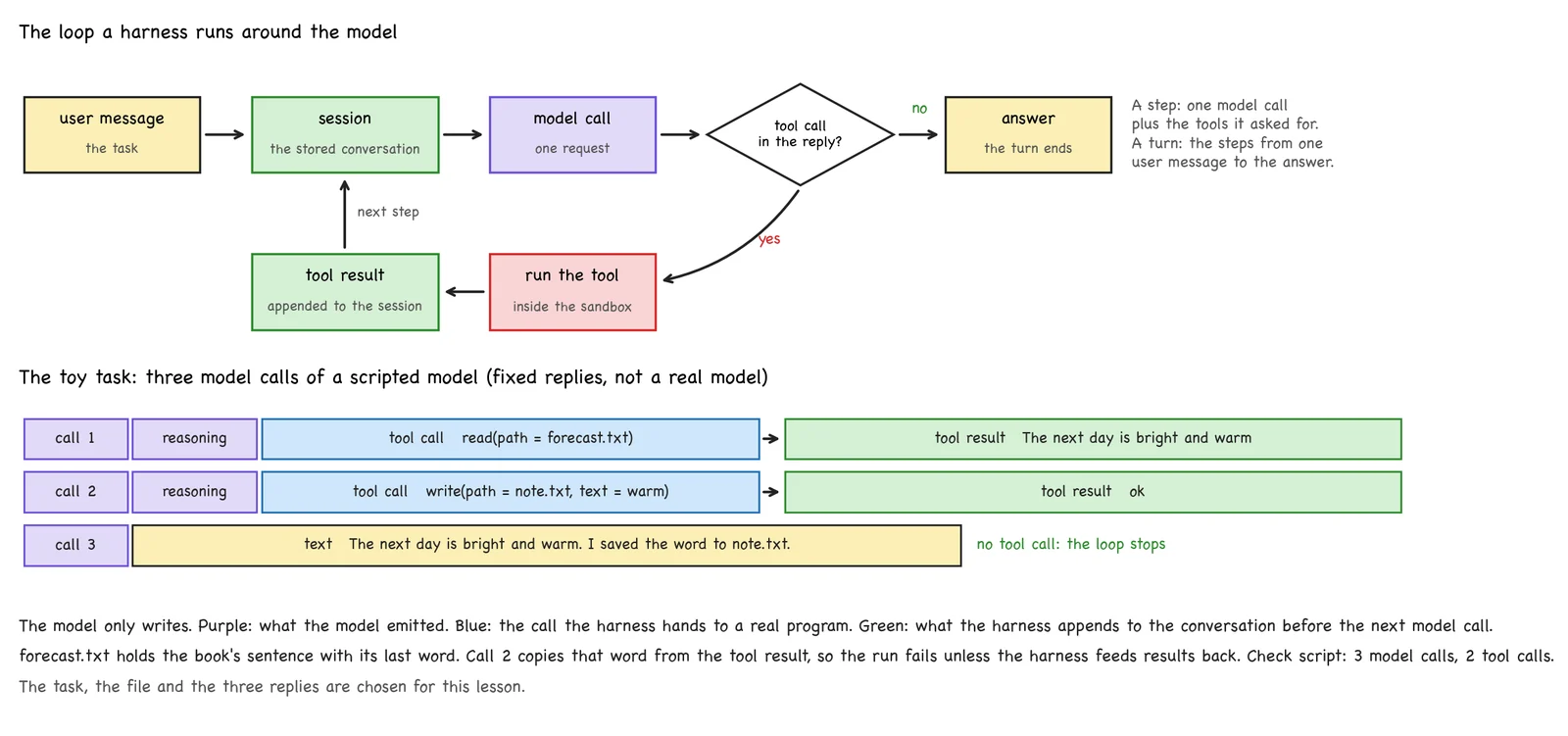
The book's model answers one prompt. Lesson 14 showed a model that calls tools and thinks between the calls, and it counted four model calls for one short trajectory. The model made none of those calls happen. It wrote a tool call and stopped. Some program received the call, ran a real tool, appended the result to the conversation and called the model again. The same program has to keep the conversation, decide when to stop, and keep the tools from doing damage. That program is the harness, and we need six words to describe it.
harness      the program around the model that does everything below
agent loop   call the model; if it asked for tools, run them and call it again; otherwise stop
tool         a function the model may request by name, with arguments
session      the stored record of one conversation, from which every request is built
sandbox      the boundary around what a tool may touch on the machine
plugin       a part of the harness that can be added or removed without editing the others
Our task is small, and its file holds the book's sentence. The file forecast.txt contains "The next day is bright and warm", and the user asks: "Read forecast.txt and save its last word to note.txt". We do not call a real model. A scripted function returns fixed replies: a read call, then a write call carrying the last word of whatever the read returned, then one sentence. It is a toy, and it makes every run identical (figure 29.1).
2. Attempt 1: one loop, two tools
The simplest harness is a while loop of 20 lines.
def harness_v1(task, files):
    messages = [{"role": "user", "content": task}]
    trace = ["user/message"]
    while True:
        reply = scripted_model({"messages": messages})
        messages.append({"role": "assistant", "content": reply})
        trace.append("assistant/message")
        calls = [b for b in reply if b["type"] == "tool-call"]
        if not calls:
            return reply[-1]["text"], trace
        for call in calls:
            args = call["arguments"]
            if call["name"] == "read":
                result = files[args["path"]]
            elif call["name"] == "write":
                files[args["path"]] = args["text"]
                result = "ok"
            messages.append({"role": "tool", "toolCallId": call["id"], "content": result})
            trace.append(f"tool/call {call['name']}")
            trace.append("tool/result")
It works.
user/message → assistant/message → tool/call read → tool/result → assistant/message
             → tool/call write → tool/result → assistant/message
3 model calls, 2 tool calls        note.txt = "warm"
answer: The next day is bright and warm. I saved the word to note.txt.
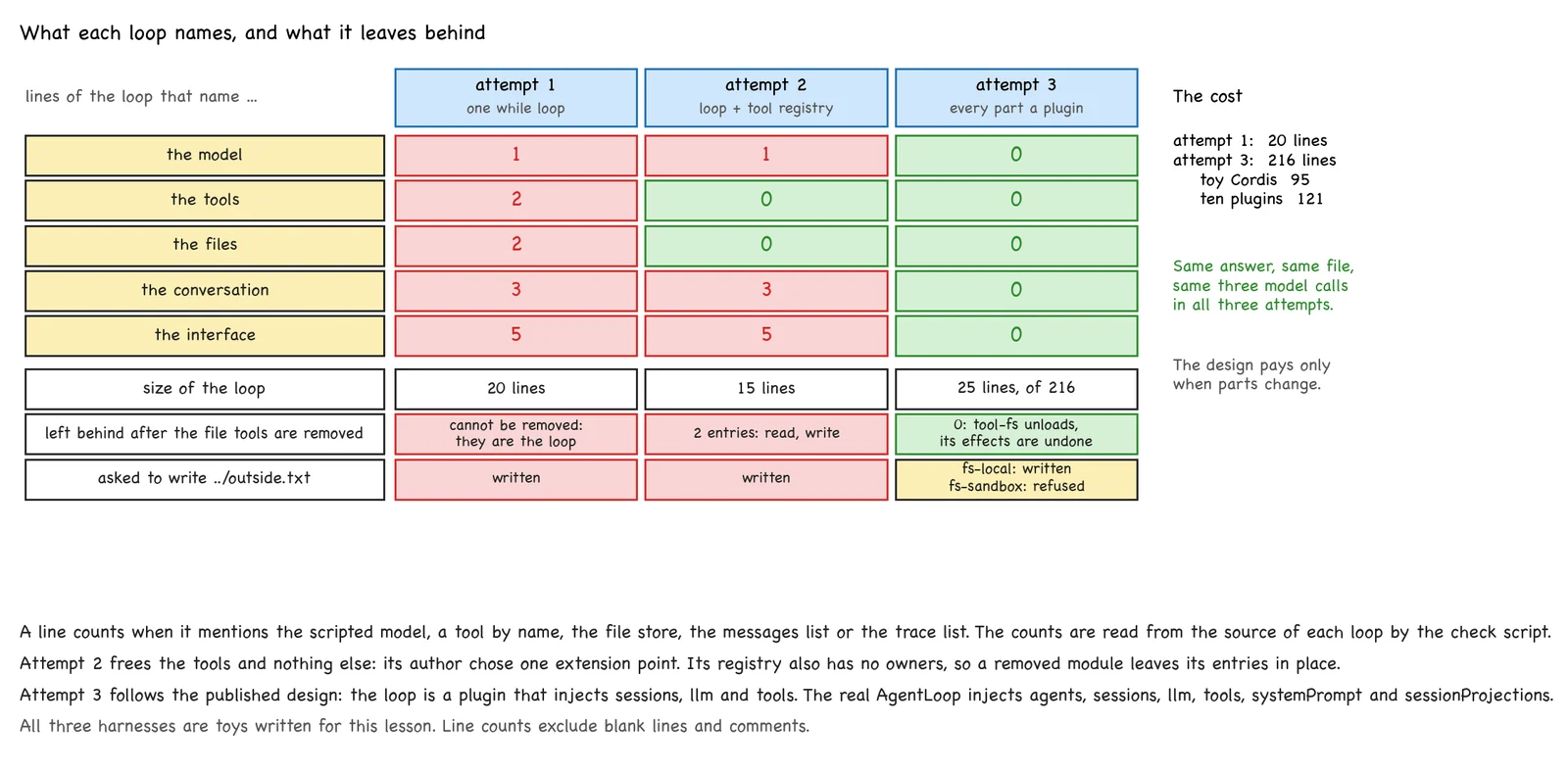
Now suppose we want a second model, a third tool, files on another machine, a conversation stored on disk, or a web page in place of the returned list. Each of these is named inside the loop.
lines of the loop that name     the model   the tools   the files   the conversation   the interface
attempt 1                       1           2           2           3                  5
Every change is an edit to the same function. The loop has no boundary either. Asked to save the word to ../outside.txt, it does.
3. Attempt 2: a tool registry
The usual repair is an extension point: a fixed place where outside code may add something. We give the loop a dictionary from tool names to functions, and a separate module registers read and write in it. The loop shrinks to 15 lines, and a third tool is one more register call.
lines of the loop that name     the model   the tools   the files   the conversation   the interface
attempt 2                       1           0           0           3                  5
Two problems remain. The model, the conversation and the interface are as fixed as before, because the author of the loop chose one extension point, and nobody can add another without editing the loop. The registry also does not know who registered what. When we remove the module that added the file tools, read and write are still in the dictionary. Removing a part cleanly means restarting the program (figure 29.2).
4. Everything is a plugin
deepseek-harness, MIT-licensed and run with the command dsh, takes the idea to its end. Its architecture document says that "every part of the product is a plugin, including the model adapter, the tool registry, the session log, and the agent loop itself", and that there is "no privileged core to patch". A plugin provides named services and declares the services it needs. Nothing else connects the parts.
We rebuild the toy in this way, with the repository's names. The loop becomes one plugin among ten.
@plugin("agent-loop", inject=["sessions", "llm", "tools"])
def agent_loop(ctx):
    def followup(text, provider):
        log = ctx.sessions
        log.append("turn/start")
        log.append("user/message", {"role": "user", "content": text})
        ...                                   # the same loop, written against ctx.llm and ctx.tools
    ctx.provide("agentLoop", followup)
This loop names no model, tool, file, conversation store or interface: all five counts are 0. The real class is AgentLoop in packages/core/agent-loop/src/index.ts. It registers itself as agentLoop and declares static inject = ['agents', 'sessions', 'llm', 'tools', 'systemPrompt', 'sessionProjections'].
The same task gives the same answer and the same file. The trace is now the session log, written with the repository's event names.
 1 turn/start     2 user/message
 3 step/start     4 assistant/message    5 tool/call read     6 tool/result    7 step/end
 8 step/start     9 assistant/message   10 tool/call write   11 tool/result   12 step/end
13 step/start    14 assistant/message   15 step/end
16 turn/end completed
A step is one model request plus the tools it calls. A turn runs from one user message until nothing is owed. The price is code: 20 lines have become 216, of which 95 are the framework and 25 the loop. The design pays only when parts change.
5. Cordis: composing in space and in time
The framework under the harness is Cordis, copied into vendor/cordis. Its paper names two properties a program needs when its parts come and go while it runs. Temporal composability is "the ability to completely revert a component's side effects upon removal". Spatial composability is "the ability to declare and reactively manage inter-component dependencies". The first is about time: what is left after a part leaves. The second is about space: which parts stand beside one another, and what each needs from the rest. The paper takes an agent harness that modifies itself as one motivating case. Without the first property, it says, every change "forces a full restart". Its two mechanisms are revertible effects, where every change to the shared context carries its own inverse, and reactive coeffects, where a component states what it requires and is activated or deactivated as the context changes.
Six objects in the code carry the two properties.
| Object | Name in vendor/cordis/src |
What it is |
|---|---|---|
| context | Context, written ctx |
the container a plugin receives; everything the plugin does goes through it |
| plugin | a function with name and inject, an object with apply, or a Service subclass |
one part |
| service | class ToolsService extends Service, super(ctx, 'tools') |
a named capability, reached as ctx.tools |
| dependency declaration | inject = ['tools'] |
the plugin waits until these services exist |
| effect and disposal | ctx.effect(() => dispose), fiber.dispose() |
every registration returns its own undo |
| lifecycle | Fiber, FiberState |
PENDING, LOADING, ACTIVE, FAILED, UNLOADING, DISPOSED |
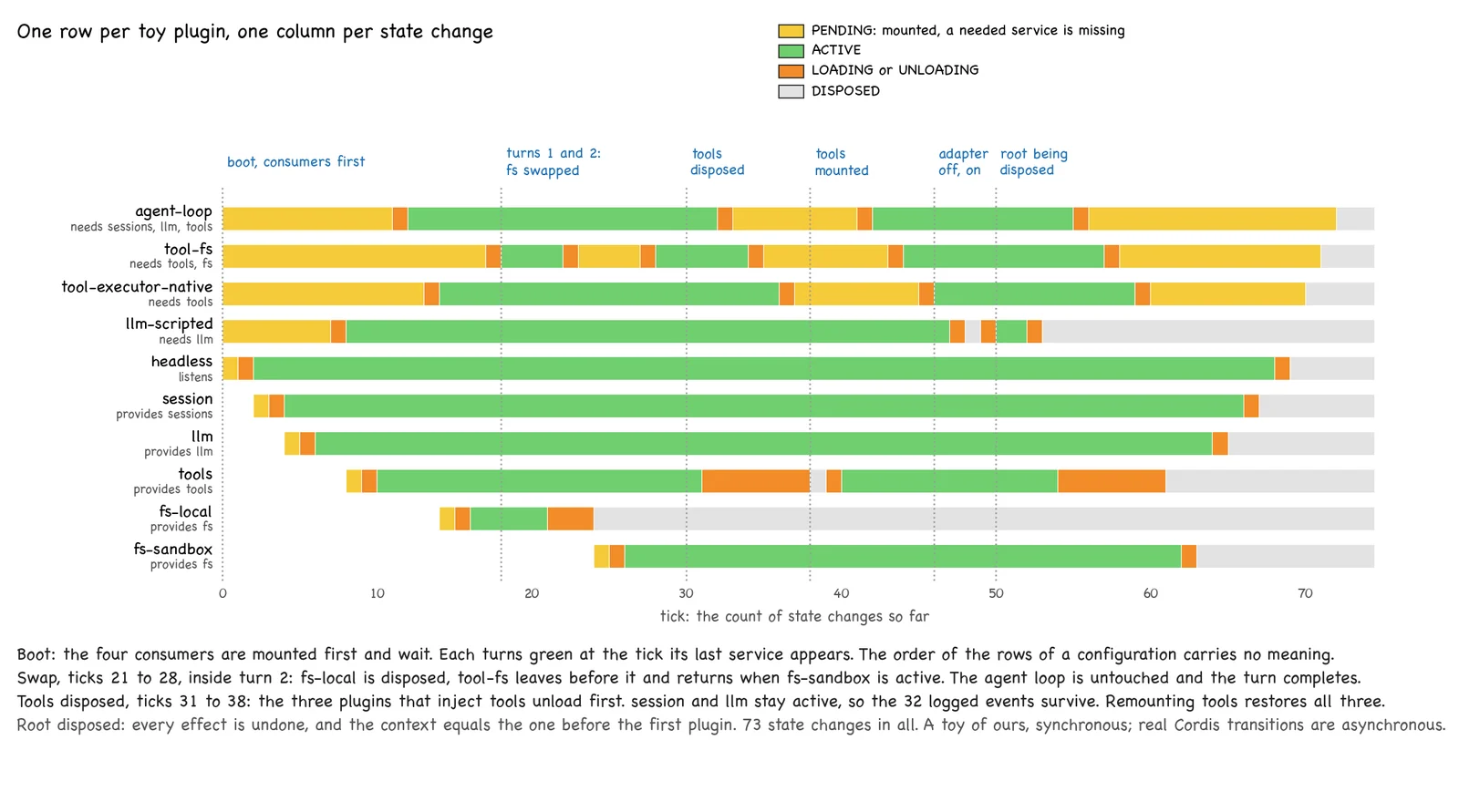
A fiber is one loaded instance of a plugin. Because dependencies are declared, the loading order is written nowhere. We mount the toy's plugins with the consumers first. The loop, the file tools, the executor and the adapter wait in PENDING, and each becomes ACTIVE when its last service appears. The harness's base configuration says the same of its 99 rows: "Row order carries no load semantics".
6. A real plugin
This is packages/core/tool-executor-native/src/index.ts without its imports and comments. The markers are ours.
export class NativeToolExecutor implements ToolExecutor {
  private readonly pipeline: ToolExecutionPipeline

  constructor(ctx: Context, private readonly maxParallel: () => number = () => 10) {
    this.pipeline = new ToolExecutionPipeline(ctx)                       //A
  }

  describe(tools: readonly ToolDefinition[]): ToolModelInput {           //B
    return { schemas: tools.map(definition => projectToolSchema(definition, false)) }
  }

  execute(input: ToolBatchInput): Promise<ToolBatchResult> {             //C
    return executeToolBatch(input, this.pipeline, this.maxParallel)
  }
}

export const name = 'native-tool-executor'
export const inject = ['tools']                                          //D

export function apply(ctx: Context): void {
  ctx.tools.setExecutor(new NativeToolExecutor(ctx))                     //E
}
//A The guarded pipeline of section 11, built on the plugin's own context.
//B The tool schemas shown to the model.
//C A batch of calls from one model reply, at most 10 at a time.
//D The dependency declaration: this plugin stays PENDING until a tools service exists.
//E The only thing the plugin does. setExecutor is an effect, so unloading the plugin undoes it.
The undo in packages/core/tools/src/index.ts clears the selection and does not fall back to another executor, "so a program cannot fall through to a different executor".
7. Unloading while the harness runs
We run three experiments on the toy (figure 29.3).
A provider is replaced in the middle of a turn. After the first tool result we dispose fs-local and mount fs-sandbox, a second provider of ctx.fs.
tick 21  fs-local     ACTIVE → UNLOADING
tick 22  tool-fs      ACTIVE → UNLOADING      its two tools leave ctx.tools
tick 23  tool-fs      UNLOADING → PENDING
tick 24  fs-local     UNLOADING → DISPOSED
tick 25  fs-sandbox   PENDING → LOADING
tick 26  fs-sandbox   LOADING → ACTIVE
tick 27  tool-fs      PENDING → LOADING
tick 28  tool-fs      LOADING → ACTIVE        read and write are registered again
The dependent leaves before its provider does, and returns by itself. The turn continues: read ran on one provider and write on the other, and the answer is unchanged. Nobody edited or restarted the loop.
A service the loop needs is withdrawn. Disposing tools first unloads the loop, the file tools and the executor, and then the service. ctx.get('agentLoop') returns nothing. The 32 events of the session log are still there, because the session plugin never depended on tools. Mounting tools again brings all three back.
Only the adapter is removed. The loop stays ACTIVE, since it needs llm and not one particular adapter. A message then fails with NO_ADAPTER, the error code of the real ctx.llm, and the log closes the turn with the reason error.
Finally we dispose the root. Before, the context holds six services, one listener, two tools and one adapter. After, it holds nothing, and it equals the context before the first plugin. That equality is temporal composability on our toy. Attempt 2 left two registrations behind.
The real packages lean on the same behaviour. packages/shell/tool-bash/src/index.ts registers a bash tool with background jobs while a jobs service exists, and registers the plain tool again when that service goes away.
8. How the repository is laid out
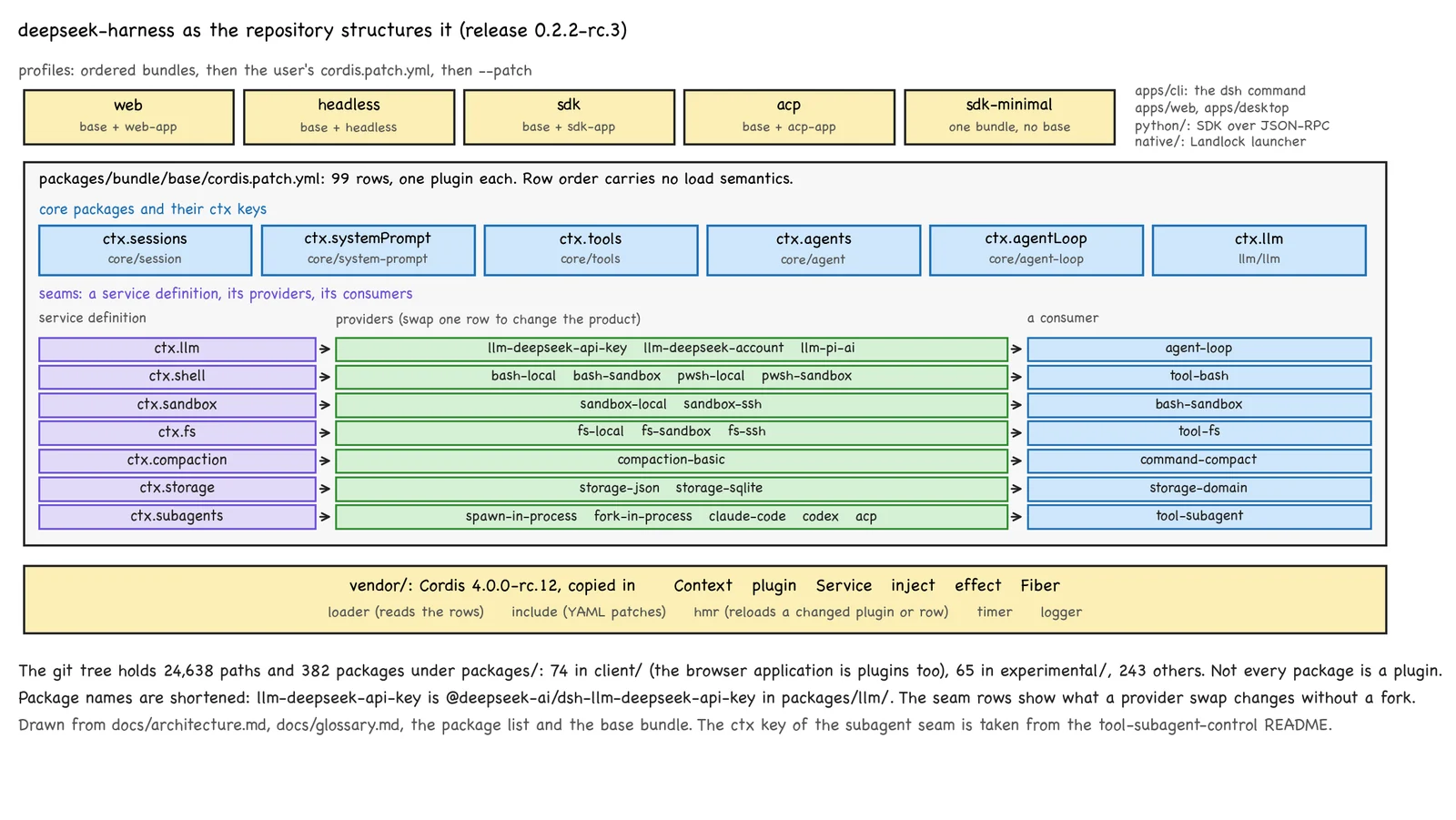
A running dsh is a plugin tree composed from layers (figure 29.4). A profile (web, headless, sdk, sdk-minimal, acp) names an ordered list of bundles. A bundle carries a YAML file of rows, one plugin per row, and the user's own patch file comes last and may replace any row by its id. Third-party plugins are npm packages installed into a profile, and the README asks their authors to tag the repository with the GitHub topic dsh-plugin. npx @deepseek-ai/dsh web boots the web profile and serves the interface at http://127.0.0.1:3080.
vendor/      Cordis, its loader and hot reload, copied in at upstream 4.0.0-rc.12
packages/    382 packages: 74 browser-side under client/, 65 under experimental/, 243 others
apps/        cli (the dsh command), web, desktop (Electron)
python/      an SDK that drives dsh as a subprocess over JSON-RPC
native/      the Landlock launcher used by the Linux sandbox
website/     the documentation site
The table lists the kinds of plugin that exist, with one example of each.
| Kind | Example | Path | What it provides |
|---|---|---|---|
| agent loop | dsh-agent-loop |
packages/core/agent-loop |
ctx.agentLoop, the driver behind ctx.agents |
| session log | dsh-session |
packages/core/session |
ctx.sessions, an append-only event log |
| session persistence | dsh-session-persistence-jsonl |
packages/session/session-persistence-jsonl |
one JSONL file per session |
| storage | dsh-storage-json |
packages/storage/storage-json |
the backend json on ctx.storage |
| model adapter | dsh-llm-deepseek-api-key |
packages/llm/llm-deepseek-api-key |
the route deepseek-official on ctx.llm |
| tool | dsh-tool-bash |
packages/shell/tool-bash |
the tool bash on ctx.tools |
| tool executor | dsh-tool-executor-native |
packages/core/tool-executor-native |
how a batch of calls is run |
| execution environment | dsh-bash-sandbox |
packages/shell/bash-sandbox |
ctx.shell, confined |
| sandbox | dsh-sandbox-local |
packages/sandbox/sandbox-local |
ctx.sandbox on Linux, macOS and Windows |
| approval | dsh-user-approval |
packages/interaction/user-approval |
ctx.approval |
| context management | dsh-compaction-basic |
packages/compaction/compaction-basic |
ctx.compaction |
| subagents | dsh-subagent-spawn-in-process |
packages/subagent/subagent-spawn-in-process |
the provider spawn |
| interface | dsh-client-ui-session |
packages/client/ui-session |
a part of the browser application |
The repository calls a swappable capability a seam, with three roles: a service definition (dsh-shell), providers (dsh-bash-local, dsh-bash-sandbox) and consumers (dsh-tool-bash).
9. One message through the real code
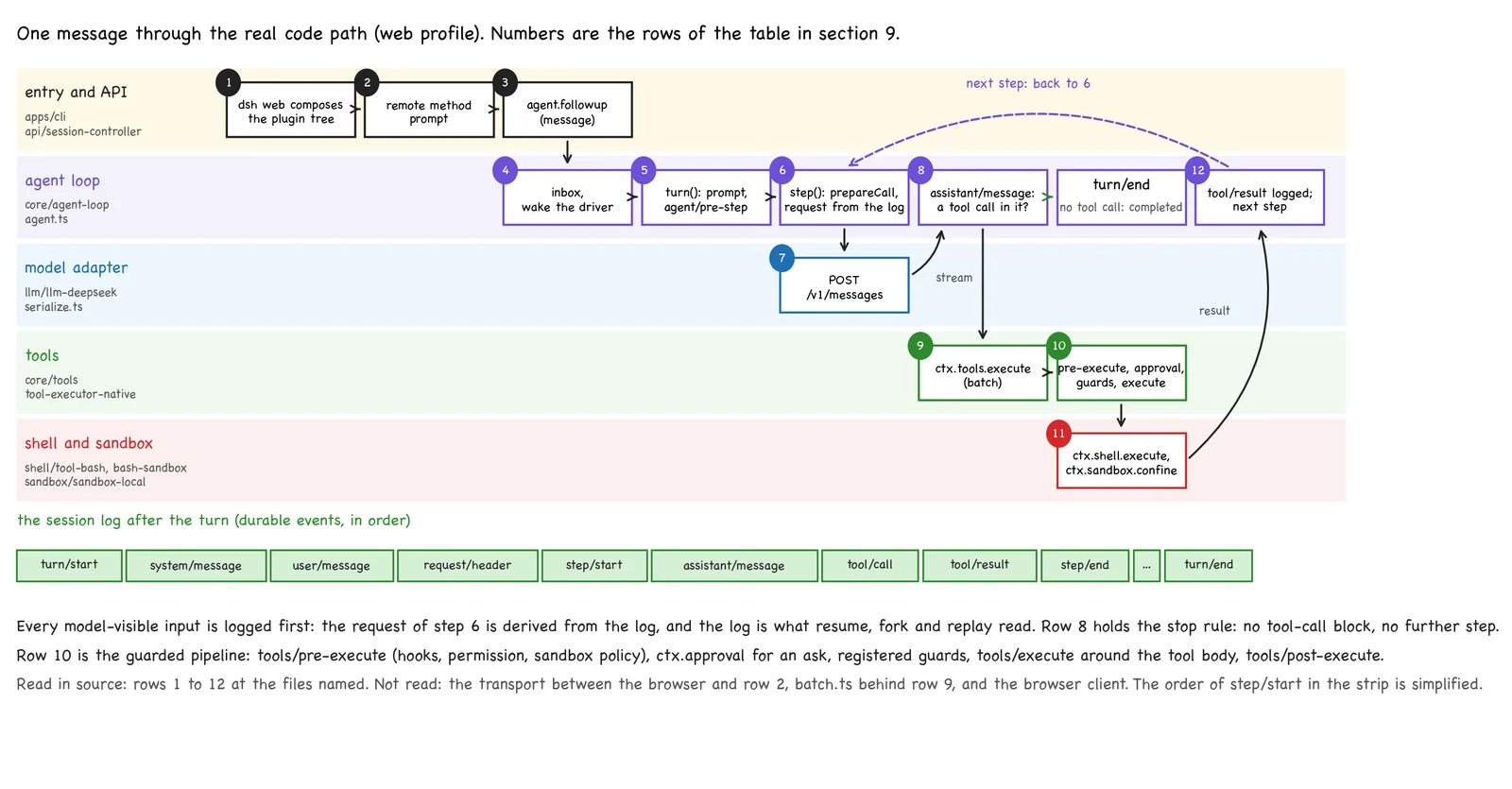
We follow one message typed into the web interface (figure 29.5).
| # | What happens | File |
|---|---|---|
| 1 | dsh web composes the plugin tree of the profile |
apps/cli/src/bin.ts, apps/cli/src/profile-boot.ts |
| 2 | the browser's request reaches the remote method prompt. The transport between the two was not read |
packages/api/session-controller/src/index.ts |
| 3 | the controller resolves or resumes the agent and calls agent.followup(message) |
packages/api/session-controller/src/commands.ts |
| 4 | followup puts the message in the inbox and wakes the driver |
packages/core/agent-loop/src/agent.ts, send and kick |
| 5 | turn() appends turn/start, assembles the prompt and tool schemas, and runs the agent/pre-step hooks |
same file, turn and preStep |
| 6 | step() binds the adapter with ctx.llm.prepareCall, appends system/message and user/message, and derives the request from the log |
same file, step and buildRequest |
| 7 | the adapter serializes the request and posts it to /v1/messages |
packages/llm/llm-deepseek/src/serialize.ts, adapter.ts |
| 8 | the stream is appended as one assistant/message. With no tool-call block the step returns completed |
agent.ts, step |
| 9 | otherwise ctx.tools.execute({ calls, … }) hands the batch to the selected executor |
packages/core/tools/src/index.ts, packages/core/tool-executor-native/src/index.ts |
| 10 | each call passes tools/pre-execute, approval, guards and tools/execute, and reaches the tool body. batch.ts was not read |
packages/core/tools/src/pipeline.ts |
| 11 | bash calls ctx.shell.execute, which wraps the command with ctx.sandbox.confine(['bash', '-c', command], policy) |
packages/shell/tool-bash/src/index.ts, packages/shell/bash-sandbox/src/index.ts, packages/sandbox/sandbox-local/src/index.ts |
| 12 | tool/result is appended, step() returns, and turn() runs the next step from row 6. The turn ends with turn/end |
agent.ts, turn |
The stop rule of row 8 is one line of agent.ts: if (toolCalls.length === 0) return { kind: 'completed' }.
10. What the adapter sends
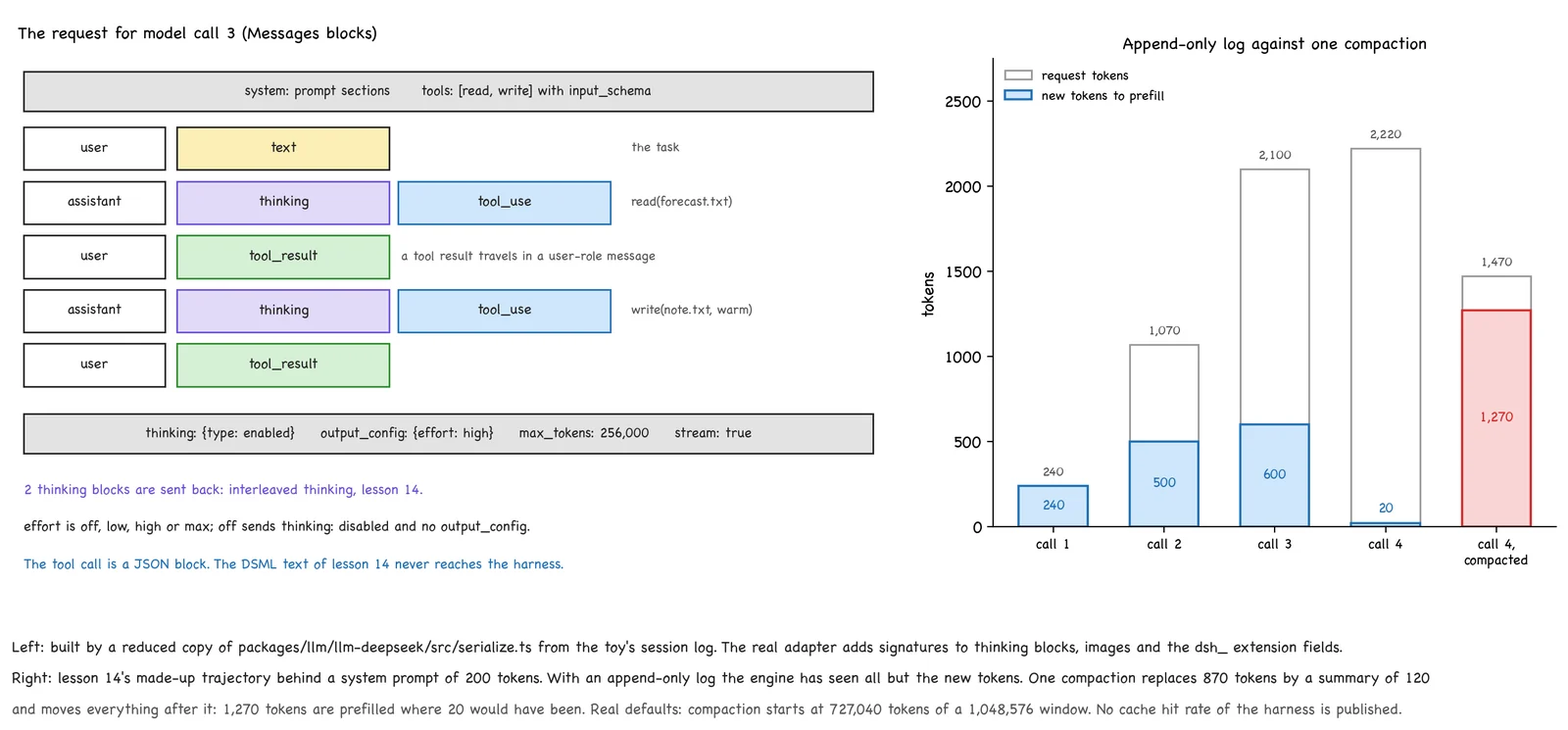
The DeepSeek adapter speaks one wire format, the Messages protocol, at https://api.deepseek.com/anthropic. For the third model call of our task, a reduced copy of serialize.ts builds this.
user        text
assistant   thinking, tool_use
user        tool_result
assistant   thinking, tool_use
user        tool_result
thinking: {type: enabled}     output_config: {effort: high}     max_tokens: 256,000
Three things from lesson 14 appear here. The reasoning effort is one of off, low, high and max, with high as the default, and it is sent as output_config.effort. The value off sends thinking: disabled instead. Interleaved thinking is visible as the two thinking blocks: the harness sends every earlier reasoning block back, with a signature it stored. Which of them the model keeps is the model's rule from lesson 14.
DSML is absent. The write call leaves and enters the harness as a JSON block.
{"type": "tool_use", "id": "call-2", "name": "write", "input": {"path": "note.txt", "text": "warm"}}
A search of the repository for "DSML" and for "deepseek-recipe" returns nothing. The DSML text of lesson 14 is written by the model and parsed on the serving side, where lesson 26's recipe accepts this same Messages protocol. The harness never sees it.
11. Safety
SAFETY.md is short and blunt. The harness "can execute model-generated code and commands, load third-party plugins", it "has not undergone a security audit", and its sandboxing and approval prompts "do not guarantee isolation or prevent damage". The advice is to "prefer a disposable virtual machine, container, or dedicated environment".
The controls that exist are plugins. The sandbox seam knows three modes, read-only, workspace-write and danger-full-access, and a mode "governs filesystem effects only". Network access is outside it. dsh-sandbox-local enforces a mode on spawned processes with bwrap or Landlock on Linux, Seatbelt on macOS and a restricted token on Windows, and reports the enforcement as full or partial. The approval seam answers one question about one action. Its outcomes are allowed-once, rejected, cancelled and unavailable, and callers proceed only on the first.
The base bundle sets these defaults.
on by default      sandbox mode workspace-write; approval policy ask; automatic compaction;
                   the web server bound to 127.0.0.1; session-log upload on the official API route
off by default     the run_code executor (tool-executor-ptc); the interrupt_agent tool;
                   full-text session search; the apply_patch tool; the plugin-manager tools
Our toy shows why the provider matters. The request to write ../outside.txt succeeds in attempt 1 and under fs-local. Under fs-sandbox the write fails, the failure returns to the model as a tool result, and the model reports it.
Two points deserve a reader's attention. With the upload on, each request to the official API carries the new part of the session log in a dsh_session_log field, and the documentation lists what that may expose, tool arguments and results included. A plugin, in turn, is ordinary code inside the harness process. We found no mechanism in the files we read that confines a plugin itself.
12. A conversation longer than the window
Part 1 built a context of a million tokens, and a long agent session still fills it. dsh-compaction-basic watches the pressure before each step. With window W, output cap O and headroom B, its trigger is as follows.
floor(min(W × 0.8, W − O − B)) = floor(min(838,860.8, 727,040)) = 727,040 tokens
W = 1,048,576     O = 256,000     B = 65,536           kept verbatim: 0.16 × (W − O) = 126,812
Above the trigger, the oldest span of history is replaced by one summary message, written by one extra model request. A second plugin first prunes any tool result above 8,192 characters to a head of 4,096 and a tail of 1,024. A third writes a result above 12,500 tokens to a file and hands the model a locator for it, so a file serves as memory for that result.
Compaction costs cache. An append-only log keeps every request a prefix of the next one, which is the stable prefix that lesson 16's cache needs. We place lesson 14's trajectory behind a system prompt of 200 tokens.
call                  1      2       3       4       4, compacted before the call
request tokens        240    1,070   2,100   2,220   1,470
new tokens            240    500     600     20      1,270
After one compaction only the system prompt stands where it stood, and 1,270 tokens are prefilled again where 20 would have been (figure 29.6). The harness guards the prefix elsewhere too. The summary request replays the old prefix, a changed system prompt is appended "after the cached history", and plan mode keeps its tool list unchanged "for request-cache stability".
13. The lifecycle in code
class Fiber:
    def refresh(self):                                                       #A
        if self.state not in (PENDING, ACTIVE):
            return
        impls = [self.root.resolve(key) for key in self.inject]
        target = None if None in impls else tuple(i["uid"] for i in impls)   #B
        if target == self.target:
            return
        if self.state == ACTIVE:
            self.unload()                                                    #C
        self.target = target
        if target is not None:
            self.set(LOADING)
            self.plugin(Context(self.root, self))                            #D
            self.set(ACTIVE)
            for key in self.provides:
                self.root.notify(key)                                        #E

    def unload(self, final=False):
        self.set(UNLOADING)
        for key in self.provides:
            self.root.notify(key)                                            #F
        while self.disposables:
            self.disposables.pop()()                                         #G
        self.provides, self.target = [], None
        self.set(DISPOSED if final else PENDING)


class Context:
    def effect(self, execute):                                               #H
        dispose = execute()
        self.fiber.disposables.append(dispose)
        return dispose

    def provide(self, key, value):                                           #I
        def install():
            self.root.uid += 1
            self.root.services[key] = {"uid": self.root.uid, "value": value, "fiber": self.fiber}
            return lambda: self.root.services.pop(key)
        self.effect(install)
        self.fiber.provides.append(key)
#A Called whenever a service this fiber injects appears or disappears.
#B The target is the identity of every provider, or None when one is missing.
#C A provider with a new identity also unloads the fiber, which then loads against it.
#D The plugin body runs with its own context.
#E Fibers that were waiting for a service of this one now load.
#F Dependents unload first, while the service is still in place.
#G Every effect is reverted, last in, first out.
#H An effect runs now and hands back its undo.
#I Providing a service is itself an effect.
Markers A to G follow algorithm 5 of the paper. The real fiber adds an asynchronous transition that must finish before the next one starts.
14. What the real harness adds
| Toy | deepseek-harness 0.2.2-rc.3 | |
|---|---|---|
| Framework | 95 lines, synchronous | Cordis, 1,914 lines in the five core files read, with a loader, YAML patches and hot reload |
| Parts | 10 plugins | 382 packages; the base bundle mounts 99 rows |
| Loop | 25 lines, one session | agent.ts, 751 lines: inbox, steering, cancellation, retries, 10 tool calls in parallel |
| Model | a scripted function | deepseek-flash and deepseek-v4-pro, window 1,048,576 |
| Tools | read, write |
bash, read, write, edit, glob, grep, web_search, web_fetch, subagent and more |
| Sandbox | a check on the path | the operating system confines the spawned process |
| Session | a list in memory | an append-only JSONL log per session, compressed, with format migrations |
| Interface | one listener | web, desktop, headless, SDK and ACP profiles |
The repository is plain about its status. The README calls it a "developer preview" and warns, in capitals, of compatibility-breaking changes. The three latest releases are marked as pre-releases. The loop's own README lists "no built-in turn budget" among its limitations, so nothing stops a model that keeps calling tools. The 65 experimental packages come "without a product-support commitment".
Not found: any measurement of agent quality or speed in the files we read; how the four effort names map to the effort values of lesson 14; anything named an asynchronous start/stop loop. The nearest is the tool interrupt_agent, which the built-in configurations switch off. We read agent.ts, serialize.ts and the Cordis core in part, and did not read the gateway, the browser client, or sections 2 to 4 and 6 of the paper.
15. What is still open
The harness of this lesson runs one loop for one agent. It has a tool named subagent and a board for teams of agents, and we have not opened either. One loop also has no watcher. With no turn budget, a model that keeps asking for tools keeps going, and the only thing that can end such a turn is another plugin that listens for agent/turn-stopping or cancels.
The last lesson takes up both. The Super-agent prototype is built on this harness and adds a Router, Workers and a Watchdog, and lesson 30 follows one task through all three.